Unit 2
Finding the bug
Run a set of steps one at a time, spot the step that goes wrong, and fix it.
Read
The robot that went the wrong way
Zara wrote a route for Robot Ravi. She wanted him to reach the star.
Forward, Forward, Turn left, Forward, Forward.
She pressed Run. Ravi went up two squares. He turned. Then he bumped into the edge of the grid. Oops!
"Ravi is broken!" said Zara.
Is he? Let's find out.
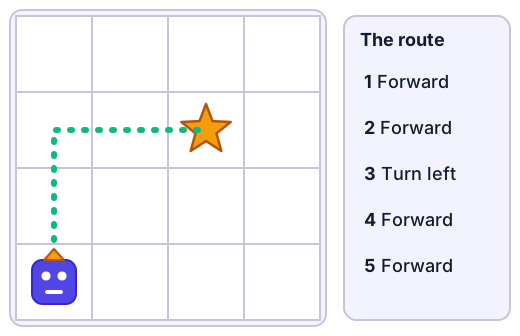
Ravi did what he was told
Ravi did every step exactly. Step 3 said Turn left, so he turned left. The star was on the right.
Ravi is not broken. The trouble is in the instructions. One step does something different from what Zara meant. That step is called a bug. Finding it and fixing it is called debugging.
A bug is a step that does something different from what you meant.
How to squash a bug
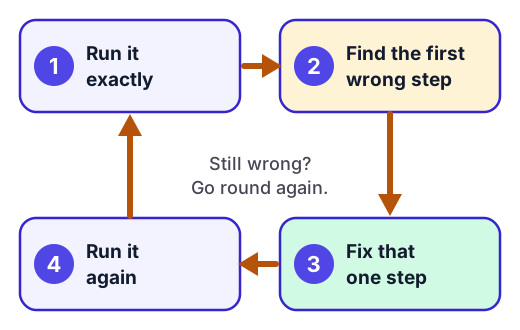
- Run it exactly. Follow the steps one at a time. Use your finger. Do not fix anything in your head.
- Find the first wrong step. Say what you wanted the robot to do. Stop at the first step where it does something else.
- Fix that one step. Change it, add the missing one, or take the extra one away.
- Run it again. Did it work? If not, go round again.
Example. Zara runs her route step by step:
- Step 1, Forward: up one square. Good.
- Step 2, Forward: up another square. Good.
- Step 3, Turn left: Ravi faces left. But the star is on the right. This is the bug.
Zara changes step 3 to Turn right and runs it again. Ravi goes up, up, turns right, and goes forward twice. He stands on the star. Debugged!
Kinds of bugs
What you see The bug The fix The robot turns the wrong way A wrong turn Change the turn The robot stops one square short A step is missing Add the step The robot goes one square too far There is an extra step Take the step away The robot does a step too early or too late Steps in the wrong order Move the step Real life has bugs too. If you spread butter on bread and then put the bread in the toaster, the butter melts into the toaster. The steps are in the wrong order!
Two things people get wrong
The bug is not always where the robot ends up. After Ravi turned the wrong way, every step after it also went the wrong way. But there was only one bug: step 3. Look for the first step that goes wrong.
The robot did not make a mistake. The steps did. Computers do exactly what the instructions say. When something goes wrong, the bug is in the steps.
Try it: Use Bug squasher. Step through each route, find the bug and fix it.
Where does the word come from?
People used "bug" for a small fault in a machine long ago. In 1947 a team working on an early computer found a real moth stuck inside it. They taped the moth into their logbook and wrote that they had found the first actual bug!
For the grown-up helping
Give your child time to find the bug themselves. Ask "What did you want the robot to do? What did it do?" and "Which step did it first do something different?" Please do not tell them the answer. Finding a bug is a skill, and it is normal to fix the wrong step first and try again: that is what real programmers do. Praise the trying ("You ran it again, good thinking") rather than only getting it right.
Lab
Bug squasher
Four routes have a bug. Step through each one, watch where the robot goes wrong, and fix it by changing, adding or taking away steps.
Your goals
- Step through a route and find the first step that goes wrong.
- Fix a wrong turn, a missing step, an extra step and a route that bumps into a rock.
The interactive lab opens once you register. Register to do this.
Activity
The silly robot
Your child tells you, the "silly robot", how to draw a face. You do exactly what the words say. Together you find the bugs and fix them. About 15 minutes.
You'll need
- Paper
- A pencil or crayon
Steps
- Say "I am a silly robot. I only do exactly what you tell me, nothing more." Hold the pencil over the paper.
- Your child gives you instructions for drawing a face, one step at a time (for example "draw a circle"). You may not guess what they meant. If they say "draw a circle", draw a tiny circle in the corner. If they say "draw an eye", draw one huge eye on top.
- Keep going for about six steps. Laugh at the silly drawing.
- Ask "What did you want me to draw? Which step first went wrong?" Point to the step together.
- Your child fixes just that one step (for example "draw a big circle in the middle of the paper"). Start a new paper and run the steps again.
- Repeat until the drawing looks like a face. Count how many bugs you found.
Safety
- Use pencils or crayons only, sitting at a table.
Keeping a log of the activity is for registered learners. Register to do this.
Quick check
Finding the bug check
Seven questions about bugs. The robot's commands are Forward, Turn left and Turn right.
1.The route is Forward, Forward, Turn left, Forward, Forward. The robot should reach the star, but it bumps into the edge. Which step is the bug?
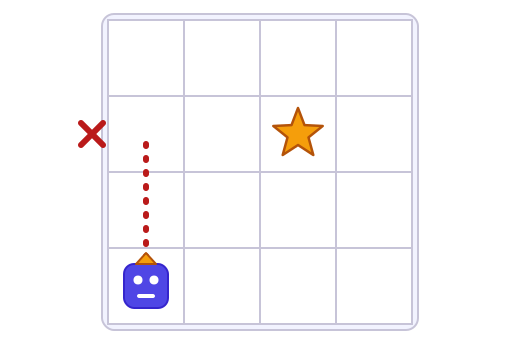
- Step 2: Forward
- Step 3: Turn left
- Step 4: Forward
- Step 5: Forward
Choose one
2.The route is Forward, Turn right, Forward, Forward, Forward. The robot starts facing up. How many squares past the star does it stop?
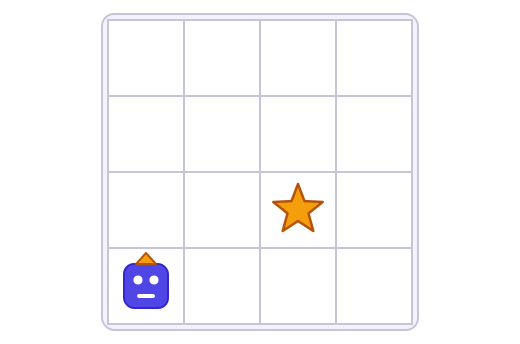
Answer with a number
3.Ana's robot goes the wrong way. What is the best first thing to do?
- Run the steps one at a time and watch where it first goes wrong.
- Throw away all the steps and start again.
- Tell the robot it is wrong.
Choose one
4.What is a bug?
- A step that does something different from what you meant
- A part of the robot that has broken
- A very hard puzzle
Choose one
5.Zoya's steps for getting her shoes on are in the wrong order. Put them in an order that works.
- Put on your shoes
- Put on your socks
- Take your socks out of the drawer
- Tie the laces
Put these in order
6.The route is Forward, Turn right, Forward. The robot should reach the star but stops short. Which fix works?
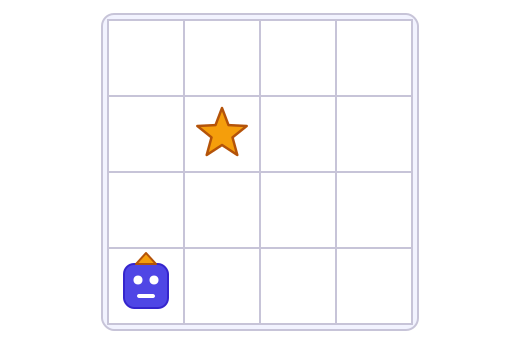
- Add one Forward at the start
- Change Turn right to Turn left
- Take away the last Forward
- Add Turn right at the end
Choose one
7.Match each problem to the fix.
- The robot turns the wrong way
- The robot goes the right way but stops one square short of the star
- The robot goes the right way but ends one square past the star
Match each to: Take away a Forward · Add a Forward · Change the turn
Answering and checking are for registered learners. Register to do this.
Quick check
New puzzles
Bugs in new places. Use what you know about finding the first wrong step.
1.Kiran's steps for painting a fence are: 1. Dip the brush in the paint. 2. Open the paint tin. 3. Paint the fence. Which fix works?
- Open the paint tin should come first
- Paint the fence should come first
- Nothing is wrong
Choose one
2.The route is Forward, Forward, Turn right, Forward, Forward, Forward. The robot starts facing up. Which step number bumps into the rock?
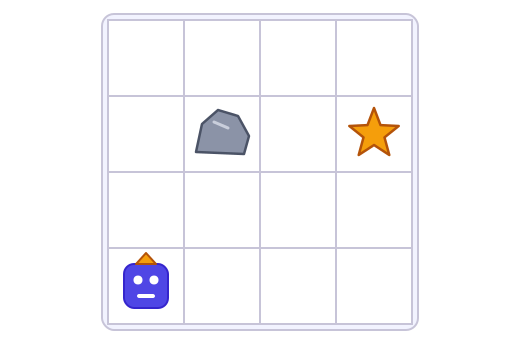
Answer with a number
3.Meera's robot did every step she wrote, but it did not reach the star. Meera says "The robot made a mistake." Is she right?
- No. The robot did what the steps said, so the bug is in the steps.
- Yes. Robots often make mistakes.
- Yes. The star must have moved.
Choose one
4.A robot faces right. The star is in the square directly below it, down the page. The steps are Turn left, Forward. What is the bug?
- Turn left should be Turn right
- Forward should come first
- There is no bug
Choose one
Answering and checking are for registered learners. Register to do this.
Activity
Tell it back
Your child explains, in their own words, what a bug is and how to find it. Three minutes.
Steps
- Ask "Zara's robot bumped into the edge of the grid. Is the robot broken? What do you think?" Let your child answer without hints.
- Ask "What is a bug?" and "How do you find it?" Your child can show with their finger on a drawn grid or with the silly drawing.
- Ask "What do you do after you fix it?" Write down what your child says in their own words.
Keeping a log of the activity is for registered learners. Register to do this.
Like what you see?
Register for free to answer the quick checks, do the activities and save your work. Your work is saved on your device and syncs to your account.