Unit 2
Loops in blocks
Use repeat and forever to do the same steps again and again, draw shapes with a handful of blocks and bring a sprite to life.
Read
Do it again, and again
Asha wants her Scratch sprite to draw a square with the pen. She snaps together blocks:
move 50 steps,turn right 90 degrees,move 50 steps,turn right 90 degrees... eight blocks, and the square is done. Then she wants an octagon, which has eight sides. That is sixteen blocks, and her stack is longer than the screen."There must be a shorter way," she says. There is. Look at what she wrote: the same two blocks, over and over. Computers are very good at doing the same thing again and again. We just have to say it once, and say how many times.
The repeat block
A loop is a set of steps that a program runs again and again. In Scratch the loop blocks are orange. The
repeat (4)block is a C-shaped block with a number in it. Whatever blocks you put inside the C run that many times.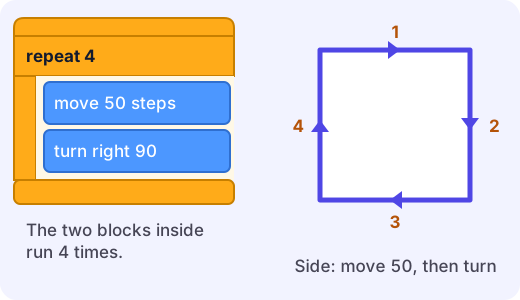
Asha's square becomes:
repeat 4move 50 stepsturn right 90 degrees
Two blocks inside, four rounds. The sprite moves 50, turns, moves 50, turns, moves 50, turns, moves 50, turns, and it is back where it began.
The number says how many rounds, not how many blocks. The blocks inside are called the body of the loop. Each round runs the whole body once, from top to bottom.
Example. How far does this sprite walk altogether?
repeat 10move 10 steps
The body has one block and it runs 10 times, so the sprite moves steps. If the body also had
turn right 90 degrees, the sprite would still move 10 steps per round, so the total is still 100 steps. It would just walk round and round a small square instead of in a straight line.Why 90? Turning to close a shape
Why does a square use
turn right 90? Think about the whole journey. To finish where it started and face the same way, the sprite must turn one full circle, which is 360 degrees, spread over all the corners. A square has 4 corners, so each turn is degrees.Shape Sides (rounds) Turn each time Triangle 3 degrees Square 4 degrees Pentagon 5 degrees Hexagon 6 degrees Octagon 8 degrees Example. Draw a hexagon with sides of 30 steps:
repeat 6, thenmove 30 steps, thenturn right 60 degrees. Check: , a full circle, so it closes.Many people expect a triangle to use 60, because the angles inside an equilateral triangle are 60 degrees. But the sprite turns by the outside angle, how much it has to swing to point along the next side. That is why it is 120, not 60. Try it in the lab to see.
Try it: What turn would a regular decagon (10 sides) need? ( degrees.)
Forever: a loop with no end
Sometimes you do not know how many rounds you need. A pet that keeps swimming, a ball that bounces until the game ends, a clock that keeps ticking. For these, Scratch has the
foreverblock. It repeats its body again and again until the project is stopped with the red stop sign. It has no flat bottom, so you cannot snap more blocks below it. Nothing after a forever block would ever get a turn.Block Use it when Example repeat (n)you know how many rounds draw a pentagon: repeat 5foreverit should go on until stopped a fish that keeps swimming Loops make animation
A walking sprite is just a loop. A sprite has two or more pictures, called costumes, of a figure in different poses. This loop makes it walk:
repeat 10next costumemove 10 stepswait 0.1 seconds
Each round the picture changes and the sprite moves a little. The
waitslows each round down so your eyes can see it. Without it, ten rounds would flash past in a blink, like a flip-book turned too fast.Things that go wrong
- Loop count and block count are different.
repeat 3with two blocks inside runs six block-steps, but only three rounds. - Blocks inside or outside? A block below the C (after the loop ends) runs once, after all the rounds. A block inside runs every round. Check which side of the edge it is on.
- A shape that does not close.
repeat 4,move 50,turn 45ends up as half an octagon, because , not 360. Turns should add to 360 (or a multiple of 360). - Forgetting to wait. Animation loops often need
waitso you can see each step.
Why this matters
Whenever you notice a pattern, a group of steps that repeats, you can put it in a loop. The program gets shorter, easier to change (just change 4 to 8), and easier to read. Programmers in every language do exactly this, in Scratch, Python and beyond.
Next, try the lab: build loops that draw shapes, then let one run forever.
Lab
The loop drawing board
Build a loop from blocks, press Run and watch the pen draw. Draw a square, a triangle and a hexagon with a repeat loop, then try a forever loop.
Your goals
- Draw a square with a repeat 4 loop that has one move block inside.
- Draw a triangle with a repeat 3 loop.
- Draw a hexagon with a repeat 6 loop.
- Run a forever loop that turns the pen, then press Stop.
The interactive lab opens once you register. Register to do this.
Activity
Be the sprite
Two people act out a loop on the floor. One is the programmer and one is the sprite who follows the blocks exactly. About 20 minutes, then an optional Scratch round.
You'll need
- A clear floor or yard about 4 metres by 4 metres
- Chalk (outdoors) or masking tape or a long piece of string (indoors) for the start line
- Paper and pencil
- Optional, a computer or tablet with Scratch
Steps
- The programmer writes a program on paper in block style. First version: move 4 steps (one big step each), turn right 90 degrees, repeated four times written out as 8 separate lines.
- The sprite starts on the start mark and follows each line exactly: walk 4 steps forward, then turn right a quarter turn, and so on. Notice where you end up.
- Now rewrite the same program using a loop: repeat 4, with the two blocks inside. Check that the sprite walks the same path and ends on the start mark.
- Try a triangle. What should the turn be? (Work out 360 divided by 3, then check by walking it. Use a bigger swing than you expect: the outside turn.)
- Swap roles. The new programmer secretly invents a loop shape (repeat 5, repeat 6...). The sprite follows it and the programmer says whether the sprite got back to the start. If not, find which number was wrong.
- Try a forever loop: forever, take one step and turn a small amount. The sprite keeps going until the programmer says STOP. What path does it make?
- Optional: build one of your loops in Scratch with the pen extension and compare the drawing to your walk.
Safety
- Choose a flat, clear space with no stairs, furniture or sharp corners. Walk, do not run.
- If you use chalk, draw only on paths or yards where it is allowed.
- The programmer says STOP early if the sprite gets near a wall or another person.
- Take a screen break if you do the optional Scratch round.
Keeping a log of the activity is for registered learners. Register to do this.
Quick check
Loops in blocks check
Eight questions about repeat and forever.
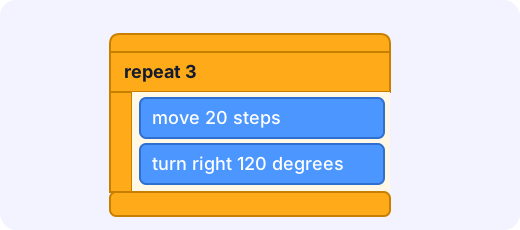
1.In total, how many steps does the sprite move when this script runs once?
Answer with a number
2.What shape does the same script draw if the pen is down?
- A triangle
- A square
- A hexagon
- A straight line
Choose one
3.A sprite runs "repeat 10, move 10 steps". How many steps does it move in total?
Answer with a number
4.To draw a regular pentagon (5 equal sides) with a repeat 5 loop, how many degrees should the turn block turn each time?
Answer with a number
5.Why is "repeat 8, move 10 steps" better than eight separate "move 10 steps" blocks?
- It is shorter and easier to change, for example you can change the 8 to a 20
- The sprite moves much faster along the stage
- It draws a curved line instead of a straight one
Choose one
6.A script says "when green flag clicked, forever, turn right 15 degrees". You click the green flag. What happens?
- The sprite turns 15 degrees once and stops
- The sprite keeps turning until you click the stop sign
- The sprite turns 15 times and then stops
Choose one
7.Which of these are true about the forever block? Pick all that apply.
- It repeats until the project is stopped
- You cannot snap a block under it, because nothing after it would ever run
- It runs its body exactly 10 times
- It suits a fish that keeps swimming for as long as the game runs
Choose all that apply
8.Match each job to the loop that fits it best.
- Draw a pentagon
- A fish swims until the game ends
- Bounce a ball exactly 10 times
- Blink twice
Match each to: repeat 5 · repeat 10 · repeat 2 · forever
Answering and checking are for registered learners. Register to do this.
Quick check
New puzzles
Use loops in situations the reading did not show.
1.Dev wants a stop-sign shape, a regular octagon with 8 equal sides. He uses repeat 8 with a move block and a turn block inside. How many degrees should the turn block turn?
Answer with a number
2.Leo builds "repeat 3, move 10 steps" and then, below the loop (outside the C), the block "say Hello! for 1 seconds". How many times does the sprite say Hello! when the script runs?
Answer with a number
3.A script is "repeat 4, then inside: move 10 steps, wait 1 seconds". Ignoring the tiny time the moves take, about how many seconds does the whole script take?
Answer with a number
4.A sprite spins using "repeat (?), turn right 15 degrees". How many rounds does it need to turn a full circle and face the way it started?
Answer with a number
5.In a game, the program must keep checking whether the player has touched the lava for as long as the game is running. Which loop fits?
- forever
- repeat 10
- No loop is needed, because it is checked once
Choose one
Answering and checking are for registered learners. Register to do this.
Your turn
Explain your loops
Write an explanation that a classmate could follow.
- Explain why
repeat 6,move 30 steps,turn right 60 degreesdraws a hexagon. Say what the 6 means, what the 60 means and why the turns add up to what they do. - How would you change the loop to draw a pentagon instead? Say both numbers you would change.
- Maya wrote
repeat 4,move 50 steps,turn right 45 degreesand says "my square is broken". What does it actually draw, and how should she fix it? - Give one job in a game or animation that needs a
foreverloop and one that needs arepeatloop. Say why each fits.
How it's judged
- Understanding what a loop does
- Changing and fixing loops
- Choosing between repeat and forever
Writing and submitting your answer is for registered learners. Register to do this.
- Explain why
Like what you see?
Register for free to answer the quick checks, do the activities and save your work. Your work is saved on your device and syncs to your account.