Unit 1
Building and tuning a simulation
Build a tiny physics world in code, then turn its knobs one at a time until the cannonball hits the target.
Read
A world you can experiment on
Think about a cricket fielder running back to catch a high ball. Without any sums, she turns, runs, and arrives just as the ball comes down. Her brain has a small model of how thrown things move. Now imagine you want a computer to do the same job, for a ball, a cannon shell or a rocket. You cannot ask the ball to try a thousand throws. But you can build a tiny world inside the computer where a ball flies, and throw it as many times as you like.
That tiny world is a simulation: a program that imitates how something behaves, so you can experiment on it instead of on the real thing. This unit is about building one and, more importantly, about tuning it.
What a simulation is made of
A simulation has three ingredients.
- State: the numbers that describe the world right now. For a thrown ball: its position and its velocity .
- Rules: how the state changes in a small slice of time. Gravity pulls the velocity down; velocity moves the position.
- Parameters: numbers you choose before you start, such as launch speed, launch angle and the strength of gravity . They are the knobs of the model.
Parameter vs. state. A parameter is set by you and stays fixed during a run (gravity, launch speed). State changes by itself as the run goes on (where the ball is). Mixing these up is a common source of confusing bugs.
The game loop
Video games, weather forecasts and flight trainers all rely on the same trick: do not solve the whole flight at once, just move the world forward by a tiny time step (say 0.02 seconds) and repeat. This repeating cycle is called the game loop.
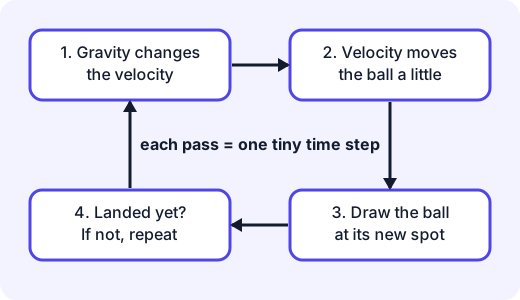
Here it is in Python-style code:
g = 9.8            # parameter: gravity, m/s^2
dt = 0.02          # parameter: time step, s
x, y = 0.0, 0.0    # state: position
vx = speed * cos(angle)   # state: velocity
vy = speed * sin(angle)

while y >= 0:      # keep going until the ball is back on the ground
    vy = vy - g * dt      # 1. gravity changes the velocity
    x = x + vx * dt       # 2. velocity moves the ball
    y = y + vy * dt
    draw(x, y)            # 3. show it
Notice that gravity only touches . Nothing pushes the ball sideways, so never changes in this simple model.
Example. Launch at m/s with m/s². Every second, falls by 9.8. After 1 s it is ; after 1.5 s it is , which is the top of the flight. So the rise takes s, and the ball is in the air for twice that: 3 s.
Why the path is a parabola
Because is constant, the ball covers equal distances sideways each step. Because keeps shrinking (and then grows downward), it rises quickly at first, slows, stops, and falls faster and faster. Put those together and the path bends into a parabola, the same curve as water from a fountain.
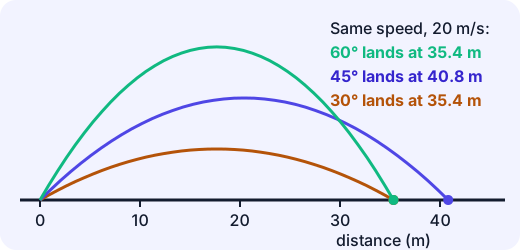
For flat ground and no air resistance there is a handy check you can use on your simulation:
At m/s, , : range m. That matches the middle arc. Notice the 30° and 60° arcs land in the same place: their values are equal. Shallow and steep throws can both reach one target.
Tuning: turn one knob at a time
Your first run will almost never hit the target. Tuning means adjusting parameters, run by run, until the output matches your goal (a target, or real measurements).
The rule that makes tuning work is the same as fair testing in science: change one parameter at a time. If you change the angle and the speed together and the ball lands closer, which change helped? You cannot tell.
A good tuning log looks like this.
Run Angle Speed Landed at What I learned 1 45° 20 40.8 m Target is at 30 m: too far 2 45° 17 29.5 m Close! Speed 17 gives about 29.5 m 3 45° 17.2 30.2 m Within 1 m of the target Run 2: m. Run 3: m. Each run changes only the speed, and the log shows exactly what each knob does. Notice also how you can predict before you run: if range grows with , a small speed change has a bigger effect than you might guess.
Misconception. "If the simulation says so, the real world will do it." A simulation only knows the rules you gave it. Our ball has no air resistance, no wind and no spin. A real cricket ball lands noticeably shorter than the formula predicts. The simulation is not wrong; it is a model of a simpler world.
Knobs are hypotheses
Setting is a claim: "gravity on this planet pulls this hard." Setting launch speed from a video is a claim about a real throw. When your simulation's output disagrees with measurements, you have learned something: one of your knobs, or one of your rules, does not match the world. You then change a knob, run again, and compare. That is an experiment, run on a model.
Try m/s² (the Moon). The same 20 m/s, 45° launch now goes m. One knob, a very different world.
Try it: In the lab that follows you tune a cannon to hit three targets. Before each shot, write down a prediction. Then compare it with what happened.
Debugging a simulation
If something looks wrong, ask which part is broken.
- Ball flies in a straight line: gravity is never applied to the velocity.
- Ball never lands (the run goes on forever): the stopping test is wrong, for example
while y >= 0replaced by a test that can never become false. The opposite slip,while y > 0when the ball starts aty = 0, stops the run before the ball has moved at all. - Ball lands in a different place when you change a lot: your step is too big. Use smaller steps and see whether the answer settles.
Summary
- A simulation is a model you can experiment on: state, rules and parameters.
- The game loop moves the world forward in tiny time steps.
- Gravity changing velocity, and velocity changing position, produce a parabola.
- Tune by changing one parameter at a time and keeping a log.
- Every parameter is a hypothesis about the world; mismatches with real data tell you which one to question.
Lab
Tune the cannon
A small cannon simulation runs the game loop for you. Turn the angle and speed knobs, fire, and read the log to hit a target on Earth, on the Moon, and over a wall. Change only one knob between shots so the log tells you what each knob does.
Your goals
- Hit the target in Level 1 (Earth).
- Hit the target in Level 2 (Moon) with the weaker cannon.
- Clear the wall and hit the target in Level 3.
- Use the "Changed" column to check you changed one knob at a time.
The interactive lab opens once you register. Register to do this.
Quick check
Simulation check
Eight questions on simulations, the game loop and tuning.
1.In a cannonball simulation, which of these is a parameter (a knob you set before the run)?
- The launch speed
- The ball's height at this moment
- The number of frames drawn so far
Choose one
2.Put one pass of the game loop in order.
- Check whether it has landed; if not, go round again
- Gravity changes the velocity a little
- The velocity moves the ball a little
- Draw the ball at its new position
Put these in order
3.A ball leaves the ground moving upward at 14.7 m/s. Gravity is 9.8 m/s². After how many seconds does it reach the top of its flight (vertical speed zero)?
Answer with a number
4.Use range = v² × sin(2θ) ÷ g. A ball is launched at 20 m/s at 45° on flat ground with g = 9.8 m/s². How far does it land, in metres (to 1 decimal place)?
Answer with a number
5.You changed both the angle and the speed, and the ball now lands closer to the target. Why is that a poor way to tune?
- You can't tell which change made the difference.
- Simulations only allow one parameter to change per run.
- Changing two knobs always makes things worse.
Choose one
6.The same launch (20 m/s at 45°) is run on the Moon, where g = 1.6 m/s² instead of 9.8. What happens to the range?
- It gets much longer, because gravity pulls less.
- It gets much shorter, because there is less gravity to push the ball forward.
- It stays the same, because the speed is the same.
Choose one
7.Match each word to its meaning.
- Simulation
- Parameter
- Game loop
- Parabola
Match each to: The curved path of a ball under gravity with no air resistance · A program that imitates a real system so you can experiment on it · A number you set that controls how the model behaves · A cycle that moves the world forward one small time step at a time
8.A student's cannonball simulation draws the ball flying in a perfectly straight diagonal line and never coming down. What is the most likely bug?
- Gravity is never being applied to the vertical velocity.
- The launch angle was set too high.
- The time step is too small.
Choose one
Answering and checking are for registered learners. Register to do this.
Quick check
New puzzles with simulations
Use what you know about models, steps and tuning in situations that are not cannonballs.
1.A launch at some speed and angle lands 10 m away. If you double the speed and keep the angle and gravity the same, how many times as far does the ball land? (Range depends on v².)
Answer with a number
2.A bouncing-ball simulation has a parameter "bounciness = 0.8". After every bounce the ball leaves the floor at 0.8 times the speed it hit with. It first hits the floor at 5 m/s. At what speed does it leave the floor after the third bounce, in m/s?
Answer with a number
3.A cooling-tea simulation updates once a minute: each minute the tea loses 10% of the gap between its temperature and the room's 20 °C. The tea starts at 80 °C. What is its temperature after 2 minutes, in °C?
Answer with a number
4.A ball starts with an upward speed of 19.6 m/s on level ground, with g = 9.8 m/s². How long is it in the air in total, in seconds?
Answer with a number
5.A simulation predicts a thrown ball lands at 45 m, but a measured throw landed at 38 m. What is the best next step?
- Decide the simulation is useless and throw it away.
- Ask which assumption might not match reality, such as air resistance, then add or tune one knob and compare again.
- Change the measured distance to 45 m so they agree.
Choose one
Answering and checking are for registered learners. Register to do this.
Your turn
Explain your tuning
A group builds a simulation of a ball kicked on level ground. It uses m/s² and no air resistance. They film a real kick: launched at about 20 m/s and 45°, it lands 33 m away. Their simulation says 40.8 m.
- Describe, step by step, how you would tune the simulation to match the video. Name which knob or knob(s) you would change, in what order, and what you would record after each run.
- Give two reasons the simulation and the video might disagree that are not mistakes in the code. Say how each reason could be added to the model as a parameter.
- "A parameter is a hypothesis." Explain this sentence using one parameter from this simulation (for example or the launch speed).
How it's judged
- A sound tuning plan
- Reasons for disagreement
- Parameter as hypothesis
Writing and submitting your answer is for registered learners. Register to do this.
Like what you see?
Register for free to answer the quick checks, do the activities and save your work. Your work is saved on your device and syncs to your account.