Unit 5
Using devices safely
Know what to keep private, what to do when something online feels wrong, and why a post can stay online.
Read
Safe and sensible online
Tara loves her tablet. She draws pictures, plays a game with her cousin and watches videos about animals.
One day, a message pops up in the game. It says: "Hi! What is your name and where do you live?" Tara does not know who sent it.
What should Tara do? First, we need to know about two things: personal information and trusted adults.
Personal information
Personal information is information that tells people who you are or how to find you.
Personal information is anything that tells someone who you are or where to find you.
Keep these private:
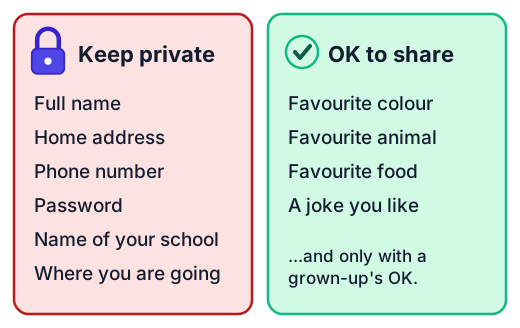
- your full name
- where you live
- your phone number
- your password
- the name of your school
- where you will be, or when your home will be empty
- photos that show these things, such as you in school uniform at the school gate
Things like your favourite colour, your favourite animal or a joke are not personal information. They do not tell anyone who you are or where to find you. Even so, always ask a grown-up before you share anything online.
A password is a secret, like a key to your door. Only you and your trusted adult should know it. Never tell a friend, even a good one.
Trusted adults
A trusted adult is a grown-up you know and feel safe with, who looks after you. It could be a parent, a carer, a grandparent or a teacher. A trusted adult is not someone who just says "trust me", and not a person you only know from a game or a chat.
Name two trusted adults now. You will need them.
When something feels wrong
Sometimes you see or hear something online that feels wrong. It might be a message from someone you do not know, a picture that scares you, or a pop-up that asks for your name. You might feel worried, confused or sad. That feeling is a signal. Listen to it.
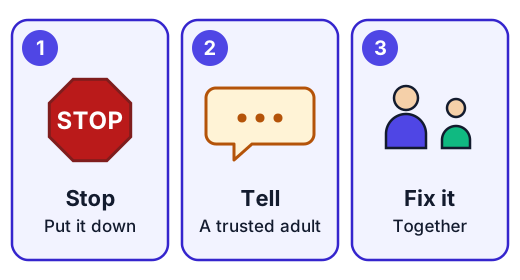
- Stop. Do not answer. Do not click. Put the device down or turn the screen away.
- Tell a trusted adult, right away.
- Fix it together. The grown-up will help you decide what to do.
You will not be in trouble for telling. Telling is the right thing to do, every time, even if you clicked something by mistake.
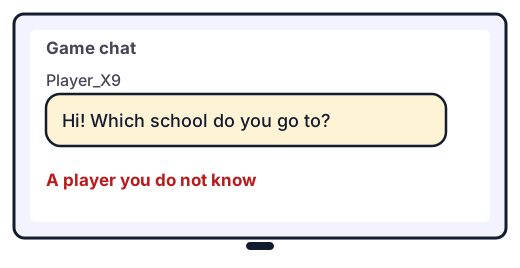
Example. In a game, a player you do not know asks: "Which school do you go to? Let's meet!"
- Tara does not answer. She does not type the school name.
- She stops playing and finds her grandmother.
- She shows Grandma the message. Together they tell the game's helpers and block the player.
What you put online can stay there
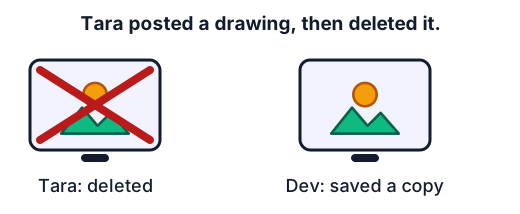
When you post a drawing, a photo or a message, other people can see it. They can save a copy, or share it again. If you delete your post later, their copies are still there. So it is hard to take things back.
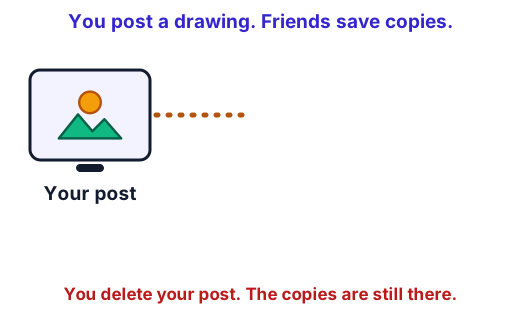
So think before you post, and ask a grown-up first. A good question to ask yourself: "Would I be happy for anyone to see this, for a very long time?"
Two things people get wrong
"A private message stays private." Not always. The person you send it to can show it to others or save it.
"I know them from the game, so they are a friend." A person you only know online is still someone you do not really know. They might not be who they say they are.
Try it: Use Safe or not. Sort what is private, choose what to do when something feels wrong, and see what happens to a post.
For the grown-up helping
Stay close while your child uses a device, and keep the conversation calm and friendly. The most important message is: "You can always tell me, and you will not be in trouble." Children hide problems when they fear losing the device. Help your child name two trusted adults. Check each app's age rules and privacy settings with them. Use pretend answers rather than real personal details when you practise.
Lab
Safe or not
Three short games. Decide what to keep private, choose what to do when something online feels wrong, and watch what happens to a post that someone saves.
Your goals
- Sort eight things into keep private and OK to share with a grown-up's OK.
- Choose the safe action in four online situations that feel wrong or risky.
- See that deleting a post does not delete the copies other people saved.
The interactive lab opens once you register. Register to do this.
Activity
My stop-and-tell plan
Your child makes a set of "keep private" cards, names their trusted adults, and practises what to do when something online feels wrong. No device is needed. About 20 minutes.
You'll need
- About 10 small pieces of paper or cards
- Two paper bags, boxes or sheets of paper, one labelled Keep private and one labelled OK to share with a grown-up's OK
- Crayons or pencils
- A large sheet of paper
Steps
- Write or draw one thing on each card, using PRETEND examples only (a pretend name, a pretend address, a pretend password). Include some things that are fine to share, such as a favourite colour or a joke.
- Your child sorts the cards into the two boxes and says why. Talk about anything they are unsure of.
- On the large sheet, your child draws or writes the names of two or three trusted adults (not strangers or online friends).
- Practise the three steps: Stop, Tell, Fix it together. You say a pretend situation, for example a message from a game friend who asks where you live. Your child shows what they do: stop, say that they are going to tell, and tell you.
- Do two or three pretend situations. Each time, say "Thank you for telling me. You did the right thing."
- Agree on one family rule for devices (for example, ask a grown-up before you share anything, or use a device in the living room). Write it on the sheet.
Safety
- Use pretend personal details only. Do not write real passwords, addresses or phone numbers on the cards.
- Stay calm and kind during the practice. Do not use scary stories.
Keeping a log of the activity is for registered learners. Register to do this.
Quick check
Using devices safely check
Seven questions about staying safe and sensible online.
1.Tara is making a game profile. Which part should she leave out to keep her personal information private?
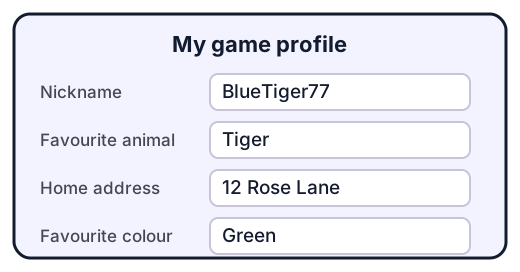
- Nickname: BlueTiger77
- Favourite animal: Tiger
- Home address: 12 Rose Lane
- Favourite colour: Green
Choose one
2.Which of these are personal information that you should keep private? Pick all that apply.
- Your full name
- Your phone number
- Your favourite cartoon
- Your password
- Your favourite fruit
Choose all that apply
3.A player you do not know asks which school you go to. What do you do?
- Type the name of my school
- Type a different school name to trick them
- Stop, and tell a trusted adult
Choose one
4.Who is a trusted adult?
- Anyone who says "trust me"
- A grown-up I know and feel safe with, who looks after me, like a parent, carer or teacher
- A kind player I met in a game
Choose one
5.Tara posted a drawing and then deleted it. Dev had already saved a copy. Could someone still have her drawing?
- No, deleting always removes it everywhere
- Yes, other people may have saved a copy
Choose one
6.Something online makes you feel scared. Put what to do in order.
- Tell a trusted adult
- Fix it together with the grown-up
- Stop and put the device down
Put these in order
7.You tell a grown-up that something online scared you. Will you be in trouble?
- Yes, you should have been more careful
- No, telling a trusted adult is the right thing to do
- Only if you clicked on something
Choose one
Answering and checking are for registered learners. Register to do this.
Quick check
New puzzles
Staying safe in new situations. Think about what is private and who you tell.
1.Kabir is choosing a username for a game. Which one is the safest?
- KabirSharma_Delhi_Class2
- BlueTiger77
- Kabir 9876543210
Choose one
2.A game says "Get a free badge! Type your birthday and home town." What is the best thing to do?
- Type the real answers fast to get the badge
- Click yes without reading it
- Stop and ask a trusted adult
Choose one
3.Mira wants to share a photo with her trusted adult's OK. Which photo is safest to share?
- Mira in her school uniform at the school gate
- A picture of a cake she baked
- Her front door with the house number
Choose one
4.Zoya posts a drawing. Arun and Mina each save a copy. Then Zoya deletes her post. How many copies of the drawing are left?
Answer with a number
5.Your friend Dev asks for your game password so he can play for you. What do you do?
- Give it to him, because he is my friend
- Say no thank you, because my password is a secret
- Write it in the game chat so he can see it
Choose one
Answering and checking are for registered learners. Register to do this.
Activity
Tell it back
Your child explains, in their own words, what personal information is and what to do if something online feels wrong. Three minutes.
Steps
- Ask "What is personal information? Can you tell me one thing that is, and one thing that is not?" Let your child answer without hints.
- Ask "What do you do if something online feels wrong?" and "Who is a trusted adult for you?"
- Ask "If you post a picture and then delete it, is it gone for good?" Write down what your child says in their own words.
Keeping a log of the activity is for registered learners. Register to do this.
Like what you see?
Register for free to answer the quick checks, do the activities and save your work. Your work is saved on your device and syncs to your account.