Unit 5
Pictures as numbers
Colour a pixel grid from a list of numbers, then write the numbers for a picture yourself.
Read
A heart made of numbers
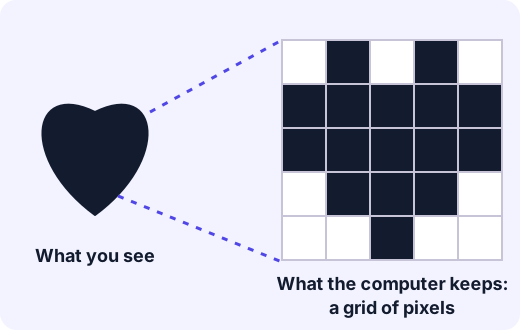
Sana has a photo on her tablet. She puts two fingers on the screen and spreads them apart to zoom in. The picture gets bigger and bigger. Soon she can see that it is not smooth at all. It is made of tiny squares!
Each little square is a pixel. A pixel is one tiny square of one colour. When you put lots of pixels side by side in a grid, your eyes see a picture.
A computer cannot see a picture
You can look at a heart and know it is a heart. A computer can't. A computer only stores numbers. So to keep a picture, it has to turn the picture into numbers.
Here is a simple way to do it. We have a grid of pixels, and each pixel is either white or black. We make up a code:
- 0 means a white pixel.
- 1 means a black pixel.
Then we write each row of the grid as a row of numbers, reading from left to right. We start at the top row and go down.
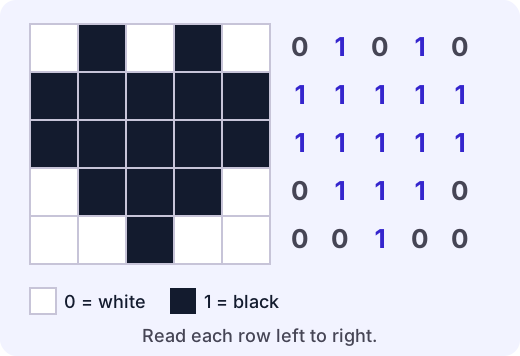
Example. Look at the top row of the heart. It is white, black, white, black, white. In numbers, that is 0 1 0 1 0. The second row is all black: 1 1 1 1 1.
So the whole heart is only 25 numbers. Anyone who knows the code can draw it again!
Try it: Open the pixel painter. Colour a heart from its numbers. Then look at a picture and write its numbers.
Colouring from numbers
You can also go the other way. If someone gives you the numbers, you can colour the picture.
Example. The numbers for one row are 1 0 0 0 1. Colour the squares from left to right:
- The first number is 1, so colour the first square black.
- The next three numbers are 0, so leave those squares white.
- The last number is 1, so colour the last square black.
The row is black, white, white, white, black.
A shorter code
Long rows of 0s and 1s are tiring to write. Here is a shorter way. Instead of writing every pixel, count how many pixels in a row are the same.
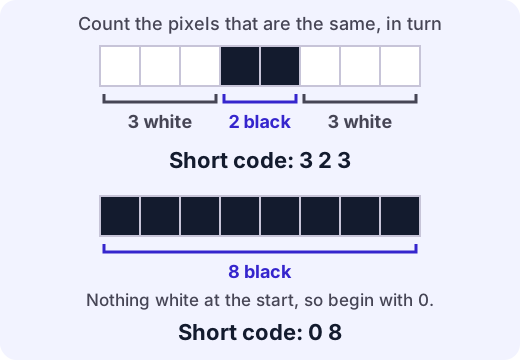
The rule is: the first number always counts white pixels. Then the numbers take turns: white, black, white, black, and so on.
- 3 2 3 means 3 white, 2 black, 3 white.
- 0 8 means 0 white (none at the start), then 8 black.
That zero matters. If a row starts with a black pixel, the code must start with 0, because there are no white pixels first.
Things to remember
Everyone has to agree on the code. If Sana's code says 1 is black, but her friend thinks 1 is white, her friend will make the picture with all the colours swapped!
The width matters. Imagine all 25 numbers of the heart in one long line with no gaps. You could not tell where one row ends and the next begins, unless you also knew the picture is 5 pixels wide. A computer must know the width as well as the numbers.
More pixels give more detail. A photo on a phone has millions of pixels, and each pixel can be any of millions of colours. Each colour has its own number. But it is the same idea as our heart: a grid of squares, and a number for each one.
For the grown-up helping
Squared paper is all you need. Let your child be the "computer" and colour a picture from a list of numbers, then swap and write numbers for a picture you drew. Mistakes in the short code are normal, especially forgetting that the first number counts white pixels. If your child finds the counting code hard, stay with the 0 and 1 code for now. It is the main idea, and the short code is a bonus.
Lab
The pixel painter
Four missions. Colour a pixel grid from a list of numbers, and write the numbers for a picture. First with 0 and 1 for every pixel, then with the short counting code. At the end you can draw your own picture and watch its numbers change.
Your goals
- Colour a grid from rows of 0s and 1s.
- Write the rows of 0s and 1s for a picture.
- Colour a grid from the short counting code, and write the short code for a picture.
The interactive lab opens once you register. Register to do this.
Activity
Secret picture codes
Your child draws a pixel picture on squared paper, writes it as a number code, and a grown-up colours the picture back from the code alone. Then you swap. About 25 minutes.
You'll need
- Squared paper (5 by 5 squares is a good size to start with), or a grid ruled on plain paper
- A black pencil, felt tip or crayon
- A second sheet of paper for the code
Steps
- Draw a 5 by 5 grid. Decide together that 0 means white and 1 means black. Write that rule at the top of the code sheet.
- Your child colours some squares black to make a simple picture, such as a letter, a heart, a house or a smiley face. Keep it on one side so no one else can see it.
- Your child writes the code. They go along the top row from left to right and write a 1 for black and a 0 for white. Then the second row, and so on. Put each row on its own line.
- The grown-up has only the code. Colour a fresh grid from the numbers, row by row. Then compare it with the original. Are they the same? If not, find the row that is different and work out whether the code or the colouring has the mistake.
- Swap roles. The grown-up draws a picture and writes the code, and your child colours it back.
- Try the short code. Pick one row, such as black, white, white, black, black, and count the squares that are the same, taking turns and starting with white. This row is 0 1 2 2, because it starts with black so there are 0 white squares first. Do a few rows this way.
- Ask your child "Why does the computer need numbers for a picture?" and "What would go wrong if we forgot to say that 1 means black?"
Safety
- Use pencils, felt tips or crayons that are safe for children, and keep the points away from faces.
Keeping a log of the activity is for registered learners. Register to do this.
Quick check
Pictures as numbers check
Seven questions about pixels and number codes. In our code, 1 means black and 0 means white.
1.What is a pixel?
- One tiny square of colour in a picture
- A kind of camera
- A number that is always 0
- A whole picture
Choose one
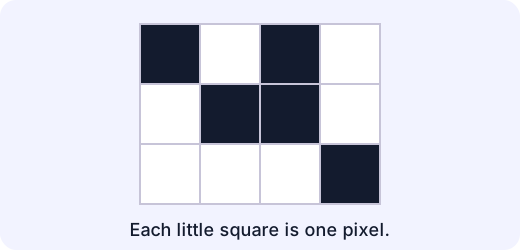
2.How many pixels (little squares) are in this grid, black and white together?
Answer with a number
3.Which numbers match this row?
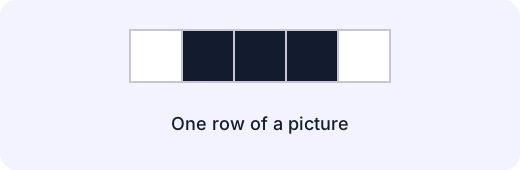
- 0 1 1 1 0
- 1 0 0 0 1
- 0 1 0 1 0
- 1 1 1 1 1
Choose one
4.Match each row of numbers to its picture.
- 1 0 0 0 1
- 0 1 1 1 0
- 1 1 1 1 1
- 0 0 0 0 0
Match each to: white, black, black, black, white · all white · black, white, white, white, black · all black
5.Colour every 1 black and leave every 0 white. Which letter appears?
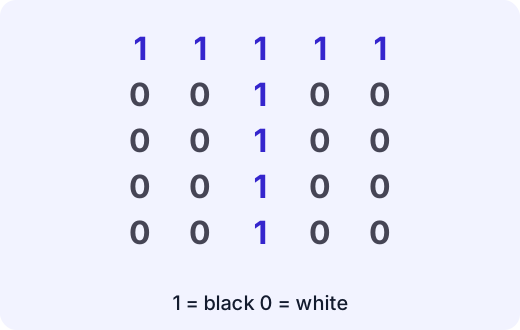
- T
- L
- H
- O
Choose one
6.In the short code, the first number counts white pixels, and then the numbers take turns. Which row has the short code 2 1 2?
- white, white, black, white, white
- black, black, white, black, black
- white, white, black, black, white
- white, black, white, black, white
Choose one
7.A row has the short code 4 4. How many pixels are in the row altogether?
Answer with a number
Answering and checking are for registered learners. Register to do this.
Quick check
New puzzles
Codes for pictures turn up in new places. Try these puzzles. 1 means black and 0 means white, unless the question says something different.
1.A picture on a screen is 10 pixels wide and 10 pixels tall. How many pixels does it have in all?
Answer with a number
2.Ali's picture has 4 rows. Every row has the code 1 0 1 0 1 0. How many black pixels does the picture have in all?
Answer with a number
3.Zara makes a picture with the code 1 = black and 0 = white. She sends only the numbers to Ali. Ali thinks 1 means white. What happens?
- Ali draws exactly the same picture
- Ali draws the picture with black and white swapped
- Ali cannot draw anything because numbers are not pictures
- Ali draws a bigger picture
Choose one
4.Which short code is a row with 4 white pixels and then 4 black pixels? (The first number counts white.)
- 4 4
- 0 4 4
- 4 0 4
- 8
Choose one
5.A row of 5 pixels is all black. What is its short code? (The first number counts white.)
- 0 5
- 5
- 5 0
- 1 5
Choose one
Answering and checking are for registered learners. Register to do this.
Activity
Tell it back
Your child explains, in their own words, how a computer can keep a picture as numbers. Three minutes.
Steps
- Show a small pixel picture with its code beside it, for example the heart. Ask "How could a computer keep this picture if it can only keep numbers?" Let your child answer before you say anything.
- Ask "What does a pixel mean?" and "What do the 0s and 1s mean?"
- Ask "How would you tell someone how to draw this picture without showing it to them?"
- Write down what your child says in their own words. Do not correct it. If they get stuck, colour a row together from its numbers and ask again.
Keeping a log of the activity is for registered learners. Register to do this.
Like what you see?
Register for free to answer the quick checks, do the activities and save your work. Your work is saved on your device and syncs to your account.