Unit 4
Online well-being
Audit your own screen time, see how apps are designed to hold your attention, and know how to respond safely to cyberbullying.
Read
Who is holding your attention?
Rohan picked up his phone after dinner to reply to one message. It took ten seconds. Then he saw a short video a friend had shared, and then the next one started on its own, and the next. When he looked up, the clock said 10:05 pm. He had meant to spend two minutes. He had been on it for fifty.
Was that a failure of Rohan's willpower? Partly. But mostly it was a success of design. Thousands of people, many of them very clever, work to make apps that are hard to put down. Knowing how that works is the first step to using your devices on purpose, rather than being used by them.
Why apps want your attention
Most of the apps you use are free. They are paid for by advertising, and an advertiser pays more when people spend more time looking at the screen. So for many apps your time and attention is what is being sold. The longer you stay, the more the app earns. That does not make every app evil, and plenty of apps are useful, but it does mean the people who make them are not neutral about how long you stay.
Attention design: five common tricks
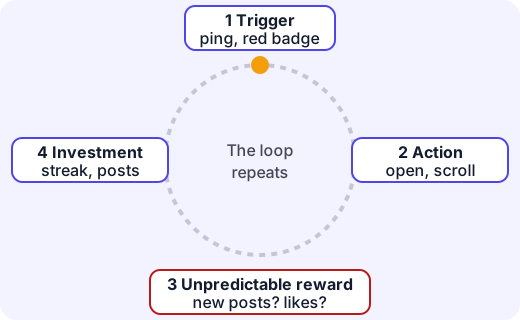
Design feature What it does to you Infinite scroll The feed never ends, so there is no natural moment to stop. Autoplay The next video starts before you decide whether you want it. Notifications and red badges Pull you back with a small "something is waiting" feeling. Streaks Create a fear of losing something you have built ("Don't lose your 25-day streak!"). Variable rewards Pull to refresh may bring something good or nothing, and unpredictable rewards are the most habit-forming kind, the same idea as in a slot machine. Add social comparison (everyone else's best moments) and fear of missing out (FOMO), and you can see why it is hard to put down. If you feel pulled, it is because you are being pulled.
Misconception. "If I can't stop, there's something wrong with me." The products are built to be hard to stop. Even adults struggle. The skill is noticing and setting up your environment so that stopping is easy.
Screen time: what does the research say?
Researchers do not agree on one magic number of hours. Studies on screen time and well-being give mixed results, and the effect on average is small. What seems to matter more is what you do on a screen, how you feel afterwards, and what it pushes out. The main worry is displacement: time on screens that replaces sleep, physical activity, homework or face-to-face time with friends and family. Health bodies recommend about 9 to 12 hours of sleep for 6 to 12-year-olds and 8 to 10 for teenagers, and screens in the hour before bed or in the bedroom are linked to later, shorter sleep.
Audit your own screen time
An audit is a careful look at what is really happening. You can try it in a week.
- Get the data. Phones and tablets have a built-in report (often called Screen Time or Digital Wellbeing) that shows minutes per app. Otherwise, keep a tally on paper for a few days.
- Group the minutes. For example: school and learning, talking to people, creating (drawing, music, coding), watching, scrolling feeds, games.
- Tag how each felt. After each type of use, ask: Did I choose this, or was I pulled in? Did I feel better, the same or worse afterwards?
- Spot the gap. The minutes where you were pulled in and felt worse are the ones to change first.
- Set one small goal and check again in a week.
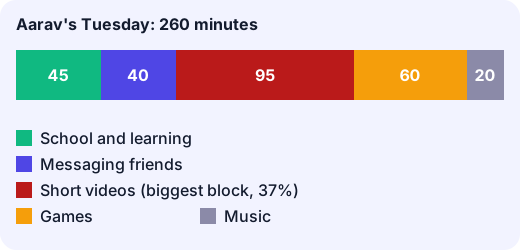
Worked example. Aarav's phone report for a Tuesday shows school and learning 45 min, messaging friends 40, short videos 95, games 60 and music 20.
Total: minutes, which is 4 hours 20 minutes.
Short videos are the largest block: , about 37% of his screen time. He tags it "pulled in, felt worse". He decides to cut short videos by 40%:
His plan: turn off autoplay, turn off notifications for that app, and charge his phone outside his bedroom at night. Then he'll check the report again in a week. A good goal is specific, small and measured.
Tools that help: switch off non-essential notifications; use grey-scale or app timers; move the app off your first screen; keep phones out of meals, the bedroom and homework time; choose a stopping point before you start ("two videos, then dinner").
Cyberbullying
Cyberbullying is when someone uses technology to hurt, embarrass, threaten or exclude another person, usually more than once. Examples: cruel messages or comments, a fake account pretending to be you, leaving someone out of a group chat on purpose, and sharing a private or embarrassing photo without permission. It is different from a one-off argument between friends, but any message that threatens you, or any private photo shared without consent, is serious even if it happens once.
Cyberbullying can feel worse than other bullying because it can follow you home, be seen by many people, and stay online.
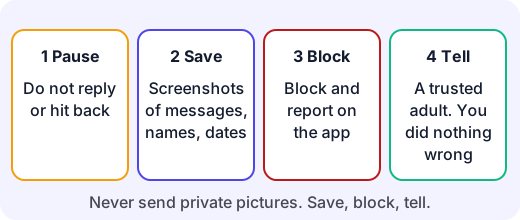
If it happens to you:
- Pause. Do not reply in anger or hit back. A reply can make it worse, and your messages may then be used against you.
- Save the evidence. Take screenshots showing the messages, names and dates. Do not delete them yet.
- Block and report the person or the post on the app. Most platforms have a report button.
- Tell a trusted adult (a parent, teacher, school counsellor). You are not "snitching" and you have not done anything wrong. In India you can also call Childline (1098), and for serious cases an adult can report at the National Cyber Crime Reporting Portal (cybercrime.gov.in). If someone threatens you or asks you for private pictures, do not send anything; save, block and tell an adult at once.
- Look after yourself. Take a break from the app, spend time with people who care for you, and talk about how it feels. If you feel hopeless or think about hurting yourself, tell an adult straight away.
If you see it happening to someone else (a bystander): do not like, share or forward it. Message the person privately to say you are on their side, and report it or tell an adult. Silence helps the bully, and support helps the person targeted.
Before you post: would you say it to the person's face? Would you be fine if your teacher or grandparent saw it? Once posted, a message can be copied and cannot truly be taken back. Many apps require users to be at least 13, so check the rules and use privacy settings. Pass on nothing that would hurt if it were about you.
Try it: For one day, write down each time you pick up your phone: why you picked it up, and whether you did what you came to do. How many times did you pick it up "for no reason"? What triggered it?
Lab
Screen audit and hook spotter
Audit a sample day of screen time (Aarav's): tag each activity as a choice or being pulled in, and set a goal to cut the pulled-in minutes. Then name the attention-design trick behind five app features.
Your goals
- Tag every activity as chosen or pulled in, and set a goal of at least a 10% cut.
- See how many minutes a week your goal would save.
- Match all five app features to their design tricks.
The interactive lab opens once you register. Register to do this.
Quick check
Online well-being check
Eight questions on attention design, screen-time audits and responding to cyberbullying.
1.Why do many free apps work hard to keep you using them for longer?
- Longer use makes the phone battery last longer
- They earn more advertising money the longer people look at the screen
- They want users to become better at studying
- They are required by law to do so
Choose one
2.Match each design feature to what it does.
- Infinite scroll
- Autoplay
- Streak counter
- Pull to refresh
Match each to: Makes you fear losing what you have built · Starts the next video before you decide · Removes any natural moment to stop · Gives an unpredictable reward that keeps you checking
3.Mia's day: homework 50 min, chatting 30 min, videos 75 min, games 25 min. What percent of her total screen time is videos? (Round to one decimal place.)
Answer with a number
4.Put these steps for responding to cyberbullying in a good order.
- Tell a trusted adult
- Pause and do not reply in anger
- Save screenshots with names and dates
- Block and report on the app
Put these in order
5.A classmate is being mocked in a group chat. Which actions help? Choose all that apply.
- Forward the worst messages to other friends to show how bad they are
- Add a laughing reaction so you are not the next target
- Message the classmate privately to say you are on their side
- Report the messages on the app or tell an adult
Choose all that apply
6.Which is the most accurate summary of the research on screen time and well-being?
- Any screen use at all harms every teenager
- Exactly 2 hours is the proven safe limit for everyone
- Screens never affect sleep
- Results are mixed; what you do, how you feel and what it replaces (sleep, activity, people) matter most
Choose one
7.Which is the best screen-time goal?
- Be a better person online
- Turn off autoplay and charge the phone outside the bedroom this week, then check the report
- Delete every app for ever
- Use my phone less
Choose one
8.Neel watches 45 minutes of short videos a day and cuts that by 40%. How many minutes does he save in a week?
Answer with a number
Answering and checking are for registered learners. Register to do this.
Quick check
New online well-being puzzles
Use what you know about attention design and online safety in situations the reading did not show.
1.A game gives bigger rewards for each day in a row you log in, and resets to zero if you miss a day. Which attention-design trick is that mostly?
- A privacy setting
- Infinite scroll
- A streak
- Autoplay
Choose one
2.Someone you only know online says they will share your secrets unless you send them private pictures. What should you do?
- Send one picture so they go away
- Delete the messages and tell nobody
- Reply with insults
- Send nothing, save the messages, block them, and tell a trusted adult straight away
Choose one
3.A phone shows 40 notifications a day. Zara turns off the non-essential ones, which removes 75% of them. How many notifications a day are left?
Answer with a number
4.A class group chat is quietly made without one classmate, and the members joke about them there. You are in the chat. What is the best step?
- Join in a little so nobody turns on you
- Don't join the jokes, message the classmate kindly, save evidence and tell a teacher or parent
- Create a worse group chat about the others
- Leave the chat and tell no one
Choose one
5.A headline says "Screens ruin all teenagers." What is the best response?
- Share it before reading it
- Reject it, because screens are always harmless
- Be cautious: research is mixed and effects depend on what teenagers do and what it displaces, such as sleep
- Believe it, because headlines are checked
Choose one
Answering and checking are for registered learners. Register to do this.
Your turn
Audit and advise
Part 1. Here is Dia's phone report for one day: school and learning 30 min, messaging family 25 min, short videos 110 min, games 45 min, drawing app 40 min. Work out her total, the percent that is short videos, and say which activity you would look at first and why (you can say which she might tag "pulled in").
Part 2. Write a specific goal for Dia with a number, one change to her phone settings, and how she will check it after a week. Explain which attention-design trick your change takes away.
Part 3. Dia's classmate Leo is getting cruel comments on a post. Write the steps you would advise Leo to take, in order, and one thing Dia can do as a bystander.
How it's judged
- Audit and arithmetic
- Goal and design tricks
- Responding to cyberbullying
Writing and submitting your answer is for registered learners. Register to do this.
Like what you see?
Register for free to answer the quick checks, do the activities and save your work. Your work is saved on your device and syncs to your account.