Unit 2
Programs with blocks
Snap blocks together in order, use a repeat block, and make a character walk along a path.
Read
Pip the cat crosses the garden
Pip the cat is on one side of the garden. A bowl of milk is on the other side. Pip can't read. Pip can't hear you either. But Pip can follow blocks.
Each block tells Pip to do one small thing. Snap the blocks together in a row, tap the green flag, and Pip does them one by one.
That row of blocks is a program.
A program is an algorithm a computer can run
You know that an algorithm is a list of exact steps. A program is an algorithm written so that a computer can run it. A tablet or a robot can't guess what you mean. It does the steps, in order, exactly as written.
You can make programs on a tablet with ScratchJr, a free app made by researchers for children aged 5 to 7. In it, you snap blocks together like puzzle pieces. Our practice board in this unit looks a bit like ScratchJr, but it is not the app itself. Everything you learn here works in the real thing too.
Blocks run in order
A program begins with a start block. In ScratchJr it is the yellow block with the green flag. After it come the sequence of motion blocks: the blocks that move the character. They run from left to right, one after another.
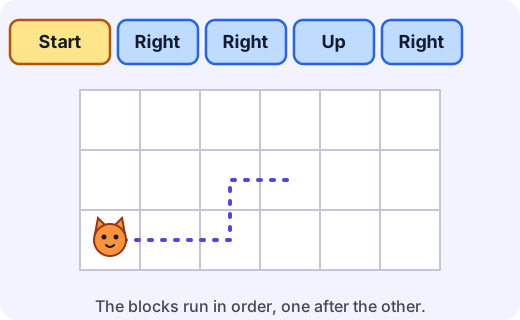
Look at the program in the picture: Right, Right, Up, Right. Pip moves two squares right, one square up, and one square right again. Change the order and Pip ends up somewhere else!
Try it: Open the block board. Build a program that takes Pip to the flag, and press Run.
Repeat blocks save work
What if Pip has to climb a staircase? Each step is Right, Up. A staircase of four steps would need eight blocks. That is a lot of blocks, and lots of places to make a mistake.
A repeat block does the same group of blocks again and again. You put the blocks you want to repeat inside the repeat block, and you choose how many times.
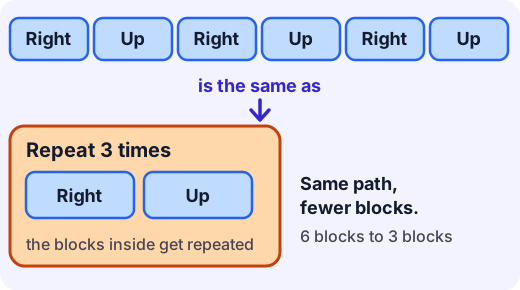
Example. Pip's staircase of four steps.
- One step is Right, Up.
- Pip does that 4 times.
- So the program is: Repeat 4 times: Right, Up.
- That is 3 blocks (the repeat and the two inside it) instead of 8.
Something to watch for
The number on a repeat block says how many times the whole group inside it is done. It is not the number of blocks. In Repeat 3 times: Right, Up, there are 2 blocks inside, and each one happens 3 times, so Pip makes 6 moves in all.
Only the blocks inside the repeat are repeated. A block after the repeat block happens just once, after the repeats are finished.
How big is a move?
In ScratchJr, each move block has a number that says how many squares to go. On our practice board every block moves one square, so we can count each block as one step.
For the grown-up helping
Let your child be the one who builds, and you be the character that does just what the blocks say. If you have a tablet, you can try ScratchJr together, but the paper and floor games in this unit teach the same ideas without a screen. When Pip goes the wrong way, ask "Which block did that?" and let your child find it, instead of fixing it for them. It is normal to put blocks in the wrong order at first. Running the program and watching what happens is how children learn to fix it.
Lab
The block board
Build a program from blocks to take Pip the cat along a path to the flag. First use a sequence of blocks, then use a repeat block to do it with fewer blocks. Then work out where a program will end before you run it.
Your goals
- Build a sequence of blocks that takes Pip to the flag without bumping into anything.
- Use a repeat block to reach the flag with fewer blocks.
- Say where a program with a repeat block will end before you run it.
The interactive lab opens once you register. Register to do this.
Activity
Program a person
Your child makes paper blocks, lays out a program, and a grown-up walks it out on a floor grid, doing exactly what the blocks say. About 25 minutes. You can finish by trying ScratchJr together if you have a tablet, but it is not needed.
You'll need
- 8 to 10 sheets of paper or card, cut into cards
- Crayons or pens
- Masking tape or chalk, to mark a floor grid of about 4 by 4 squares, each as big as a footstep
- A small toy to put on a square as the goal
Steps
- Make the cards together. Write one word on each card, large. You need about 4 cards each of Right and Up, 2 each of Left and Down, one Start card, and 2 Repeat cards. Write a number on a sticky note or a corner of each Repeat card.
- Mark the floor grid. Put the toy on a square for the goal. The grown-up stands in the starting square.
- Your child lays out a program, left to right, with the Start card first. For example Start, Right, Right, Up.
- The grown-up walks the program out, one card at a time, one square per card, doing exactly what the cards say. Your child points at each card as it happens. Does the grown-up end on the goal?
- If not, find the card that sent you the wrong way. Fix the program and walk it again.
- Now try a staircase. Put the goal 3 squares across and 3 squares up. First use only single cards (6 cards). Then show how Repeat 3 can do the same job. Put the Repeat card down, then lay the Right and Up cards on it or underneath it, to show they are inside.
- Swap roles. The grown-up lays out a program, with one mistake on purpose, and your child walks it. Can they say which card is the mistake?
- Optional. If you have a tablet, open ScratchJr and make a character walk the same path. Look for the yellow start block, the blue motion blocks and the repeat block.
Safety
- Clear the floor of toys and anything that could be tripped on, and wear socks with grip or shoes on a slippery floor.
- Use masking tape or chalk that is easy to remove.
- If you use a tablet, take a break every 15 to 20 minutes and sit comfortably.
Keeping a log of the activity is for registered learners. Register to do this.
Quick check
Programs with blocks check
Six questions. Follow each program one block at a time.
1.What is a program?
- Exact steps written so that a computer can run them
- A game you play on a tablet
- The screen of a computer
- The part of a tablet that stores power
Choose one
2.The cat starts in the bottom left square. After the program runs, which square is the cat on?
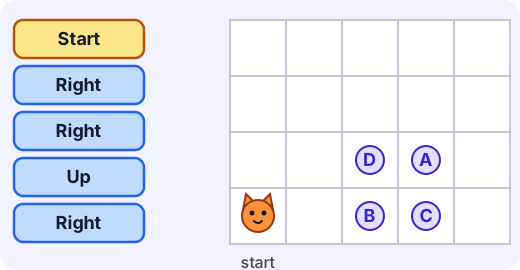
- A
- B
- C
- D
Choose one
3.The cat should climb the staircase to the flag. What number goes in the blank: Repeat ___ times (Right, Up)?
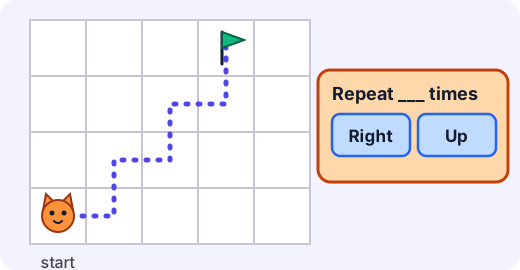
Answer with a number
4.Which program moves the cat 4 squares to the right?
- Repeat 4 times: Right
- Repeat 4 times: Up
- Repeat 2 times: Right
- Repeat 3 times: Right, Up
Choose one
5.Match each block to what it does.
- Right
- Repeat 3 times
- Start on green flag
- Hop
Match each to: Does the blocks inside it three times · Begins the program when the flag is tapped · Makes the character jump up and come down in the same place · Moves the character one square to the right
6.The cat starts in the bottom left square. After this program runs, which square is the cat on?
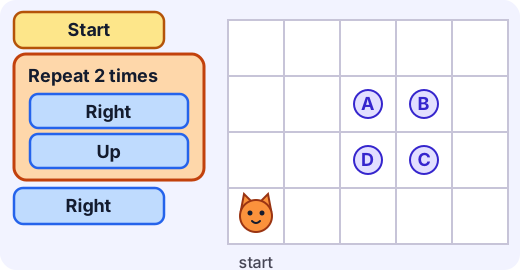
- A
- B
- C
- D
Choose one
Answering and checking are for registered learners. Register to do this.
Quick check
New puzzles
Work out what these programs do. You will not see pictures of them, so follow them in your head or draw them on paper.
1.The cat runs this program: Repeat 4 times (Right, Right, Left). How many squares is the cat to the right of where it started?
Answer with a number
2.A program says: Repeat 6 times (Right, Up). How many moves does the cat make in all?
Answer with a number
3.A road goes 3 squares right, then 3 squares up, then 3 squares right again. Which program makes the cat follow the road?
- Repeat 3 times (Right), Repeat 3 times (Up), Repeat 3 times (Right)
- Repeat 3 times (Right, Up, Right)
- Repeat 9 times (Right)
- Repeat 3 times (Up), Repeat 6 times (Right)
Choose one
4.Mia's program is: Up, then Repeat 2 times (Right), then Down. Where does the cat end up, compared with where it started?
- On the start square
- 2 squares to the right, on the same row
- 2 squares to the right and 1 square up
- 1 square down
Choose one
Answering and checking are for registered learners. Register to do this.
Activity
Tell it back
Your child explains, in their own words, what a program is and what a repeat block does. Three minutes.
Steps
- Put a short program of cards on the table, for example Start, Repeat 3 times with Right inside, then Up. Ask "What will the character do if I tap the green flag?" Let your child answer before you check.
- Ask "How is a program like the algorithms you wrote for your friend?" Listen.
- Ask "Why would you use a Repeat block instead of putting down lots of blocks?"
- Write down what your child says in their own words. Do not correct it. If they get stuck, walk the program out together and ask again.
Keeping a log of the activity is for registered learners. Register to do this.
Like what you see?
Register for free to answer the quick checks, do the activities and save your work. Your work is saved on your device and syncs to your account.