Unit 3
Events and actions
Make a character do something when you tap it, or when two characters touch, by teaching a program to wait.
Read
Pip waits for a tap
Think about a doorbell. It sits on the wall and does nothing. It waits. Then someone presses it, and ding-dong! The bell rings.
A program can wait like a doorbell. Pip the cat can sit still until something happens, and only then do a trick.
Events and actions
When you press the green flag, the blocks run one after another. But a program does not have to start that way. It can wait for something to happen.
- Something that happens is called an event. A tap is an event. Two characters touching is an event. Pressing the green flag is an event too.
- What the program does about it is called an action. The action is the blocks that run.
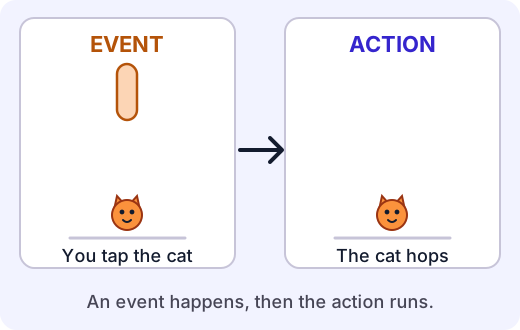
You can say every one of these programs in the same way: When this event happens, do these blocks.
When Pip is tapped, Pip hops.
Start blocks pick the event
In ScratchJr, the yellow block at the start of a script chooses the event. You already know one of them.
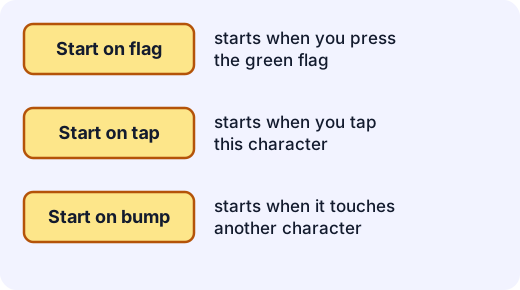
- Start on green flag waits for the green flag.
- Start on tap waits until you tap that character.
- Start on bump waits until that character touches another character.
The blocks you snap on after the yellow block are the action. If the event never happens, the blocks never run. They just wait.
Try it: Open the events stage. Make the cat hop when you tap it. Then press the flag and see what the cat does.
A touch can start something
Let's make a little game. A cat walks along the bottom of the screen. A fish sits in its way. When the cat touches the fish, the fish should swim up and away.
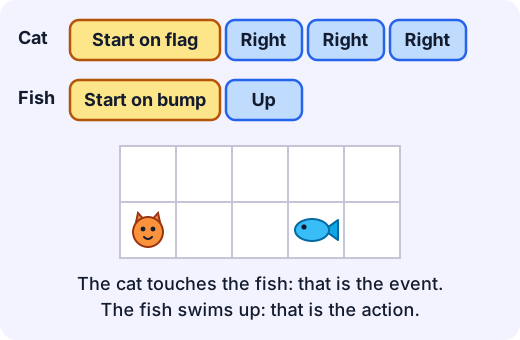
There are two scripts here.
- The cat's script starts on the green flag: Right, Right, Right.
- The fish's script starts on a bump: Up.
Example. What happens when you press the green flag?
- The flag is an event, so the cat's script runs.
- The cat moves right three times and arrives on the fish's square.
- The cat touched the fish. That is an event for the fish, so the fish's script runs.
- The fish moves up.
One event started the cat's script, and the cat's touch started the fish's script. Events can set off other events!
Two things to watch for
Nothing happens if the event doesn't happen. If a cat has a Start on tap script and you tap the dog instead, the cat does nothing. Each character only waits for its own events.
Each event runs the script again. If the cat's Start on tap script is just Hop, then tapping it twice makes it hop twice.
For the grown-up helping
Let your child be the one who decides what the event is and what should happen, and say it back as "When ..., then ...". The practice board here looks like ScratchJr but is not the app itself, and what your child learns works in the real one. Children often expect a program to do something as soon as it is built. Waiting for an event is a new idea, so it is normal to ask "Why didn't it move?" The answer is nearly always "The event hasn't happened yet."
Lab
The events stage
Build scripts that wait for a tap or a touch, then try them out. Four missions. In each one you choose the event, add the action blocks, and then make the event happen yourself.
Your goals
- Make a character hop when you tap it.
- Make a character move when you tap it.
- Make one character react when another character touches it.
- Work out which characters will react to a tap, before you try it.
The interactive lab opens once you register. Register to do this.
Activity
When this, do that
Your child writes "when ... do ..." cards, and a grown-up acts as the program that waits for events and then does the actions. About 25 minutes. No screen needed.
You'll need
- 12 to 16 small cards or pieces of paper
- Crayons or a pen
- A soft toy or two to be "characters"
- A clear patch of floor
Steps
- Make event cards together. Write one event on each card, for example "Tap my shoulder", "Clap", "Two toys touch", "Say the word go". Add a picture if your child likes drawing.
- Make action cards. For example "Hop once", "Turn around", "Take two steps forward", "Wave".
- Your child lays out three "when ... do ..." pairs side by side. For example "When I clap, hop once." Read each pair out loud as a sentence together.
- The grown-up is the program. Stand still and wait. Your child makes one of the events happen, and the grown-up does exactly the matching action and nothing else. Do each event a few times, in any order. Notice that the grown-up does nothing at all until an event happens.
- Play the touch game. Put two toys on the floor. Lay down the pair "When two toys touch, wave." Your child slides one toy until it touches the other. The grown-up waves.
- Chain two events. Lay down "When I clap, take two steps forward" and "When the grown-up taps the wall, do a hop". Walk to the wall. Ask your child "Which event started the hop?" and "What would you change so the hop happens at a different time?"
- Swap roles. The grown-up lays out the pairs, with one mistake on purpose, such as an action that does not match the event card. Your child is the program. Can they say which pair is the mistake?
Safety
- Clear the floor of toys, cables and anything to trip on, apart from the toys you are using as characters.
- Keep actions gentle, with no jumping from furniture and no running in the room.
Keeping a log of the activity is for registered learners. Register to do this.
Quick check
Events and actions check
Six questions. Think about what starts each script.
1.What is an event?
- Something that happens, like a tap or two characters touching
- A block that moves a character
- A mistake in a program
- A picture on the stage
Choose one
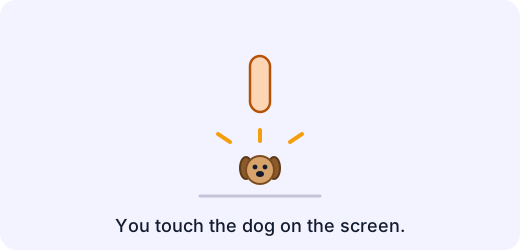
2.Which start block makes the dog bark when you do this?
- Start on green flag
- Start on tap
- Start on bump
Choose one
3.Match each thing that happens to its event.
- You touch the cat on the screen
- The cat walks into the dog
- You press the green flag
Match each to: Bump (touch) · Green flag · Tap
4.In "When the ball is tapped, it rolls right", which part is the action?
- The ball is tapped
- It rolls right
- The ball
- The word "When"
Choose one
5.A cat has this script: Start on tap, Hop, Hop. You tap the cat 3 times, one tap at a time. How many hops does the cat do in all?
Answer with a number
6.You tap the dog. What happens?
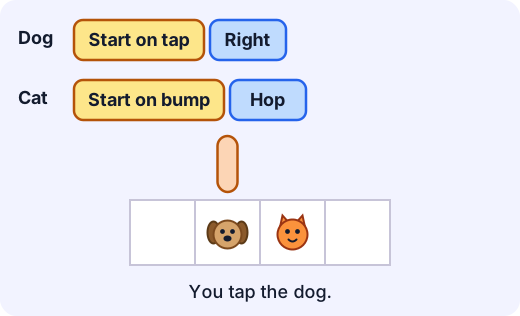
- Only the dog moves
- The dog moves right and touches the cat, so the cat hops
- The cat hops straight away, without any tap
- Nothing happens
Choose one
Answering and checking are for registered learners. Register to do this.
Quick check
New puzzles
Events are everywhere. Can you use what you know in new places?
1.In a game, a fish should swim away when the shark touches it. Which start block goes on the fish?
- Start on green flag
- Start on tap
- Start on bump
Choose one
2.A doorbell rings when you press it. If this were a program, which part is the event and which is the action?
- Pressing is the event, ringing is the action
- Pressing is the action, ringing is the event
- Both are actions
- Both are events
Choose one
3.Put these in the order they happen.
- You tap the ball
- The ball waits for the next tap
- The blocks in the script run, one at a time
- The ball's Start on tap script starts
Put these in order
4.Which of these are events? Pick all that apply.
- You tap the lion
- The lion hops
- Two characters touch
- You press the green flag
Choose all that apply
Answering and checking are for registered learners. Register to do this.
Activity
Tell it back
Your child explains, in their own words, what an event is and why a program can wait. Three minutes.
Steps
- Ask "A cat has a Start on tap script that says Hop. You build it, but you don't touch the screen. What does the cat do? Why?" Let your child answer before you say anything.
- Ask "What is the event here? What is the action?"
- Ask "Can you think of something in our house that waits for an event and then does something?" A doorbell, a light switch, a toaster and a kettle all work.
- Write down what your child says in their own words. Do not correct it. If they get stuck, tap an imaginary cat together and ask again.
Keeping a log of the activity is for registered learners. Register to do this.
Like what you see?
Register for free to answer the quick checks, do the activities and save your work. Your work is saved on your device and syncs to your account.